Managed File Transfer Automation Software

Struggling with unreliable file transfers across your workflows? JAMS eliminates fragmented data movement by centralizing file transfer control with automated retry mechanisms, dependency checking, and comprehensive compliance logging. Supporting all standard protocols—FTP, FTPS, SFTP, S3, and SCP—JAMS transforms isolated file operations into integrated business workflows, moving data across on-premises, cloud, and hybrid environments while meeting regulatory requirements.

Unify, Monitor, And Audit Every File Transfer In One Platform

JAMS makes managing file transfers an integrated part of your business and IT workflows. By incorporating file transfers with advanced job scheduling, you’ll be able to automate file transfers and ensure your data flows quickly, reliably, and securely.

JAMS file transfer features provide:

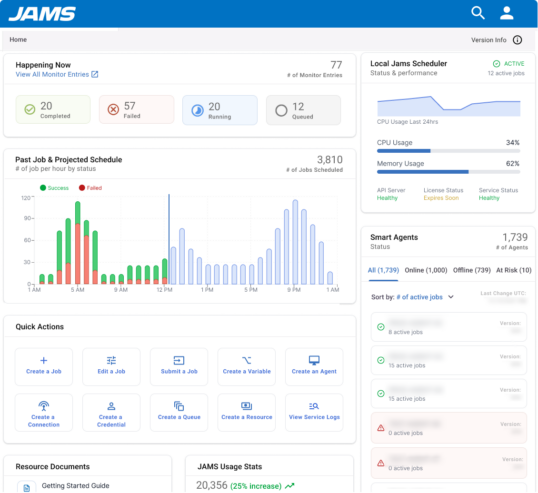
  • Centralized control: Define and run every file transfer job from a single platform, with real-time status visibility.
  • Event-driven automation: Automate job triggers based on file arrival, API calls, messages, or job completion events.
  • Proactive monitoring: Leverage alerts and auto-retries to facilitate rapid issue resolution and minimize manual intervention.
  • Robust compliance: Immutable logs and role-based access control for strong audit trails and secure operations.
  • Enhanced productivity: Streamline development and management with reusable script templates.
Unify, Monitor, And Audit Every File Transfer In One Platform

What JAMS Brings to Your Organization

JAMS is a UI-driven managed file transfer and workload automation software that delivers rapid value. Here is how organizations benefit:

Intelligent Dependency Management

JAMS ensures files transfer in the correct sequence by checking dependencies before execution. Automatically trigger downstream processes when files arrive and coordinate complex multi-step workflows across different systems and platforms without manual intervention.

Automated Retry and Reconnect

Never lose data due to temporary network issues or server unavailability. JAMS automatically attempts reconnection and retry when transfers fail, increasing resiliency and reducing the need for manual monitoring and intervention during off-hours.

Comprehensive Audit Trail and Compliance

Meet regulatory requirements with detailed logging that captures every file transfer event. JAMS maintains a complete audit trail with centralized log retention, making it easy to demonstrate compliance and troubleshoot issues when they arise.

Event-Driven File Triggers

Launch workflows automatically when files arrive at specified locations, eliminating polling and manual checks. JAMS monitors file events in real-time, instantly initiating subsequent processing steps to accelerate data pipelines and reduce latency.

Enterprise Security and Encryption

Protect sensitive data with built-in PGP encryption and decryption, secure zip/unzip capabilities, and centralized security settings. Manage user roles and access controls from a single interface, reducing security risks associated with managing multiple file transfer clients across the organization.

Deploy JAMS Managed File Transfer Automation

Here is a practical sequence for implementing JAMS as your file transfer solution.

Initial Setup

Review these steps for how to set it up:

  • Install the scheduler: Choose your deployment model — on-premise or in the cloud, on AWS, or on Azure, and follow the installation guide to configure the JAMS database, web client, and thick client.
  • Plan topology and access: Set up folders, roles, and permissions. Establish naming conventions, parameters, and calendars to maintain consistent definitions and ensure clarity. Also, configure the credential vault to remove hardcoded secrets.
  • Deploy agents: Install JAMS agents on Windows and Linux hosts that run your jobs and define queues and resources.
Create or Move a Job into JAMS

Create or move jobs into JAMS as needed, implementing automation one process at a time:

  • Configure integrations: Connect built-in integrations, including SAP, SQL databases, Azure Data Factory, PowerShell, and Python. Test connections and capture return codes and logs.
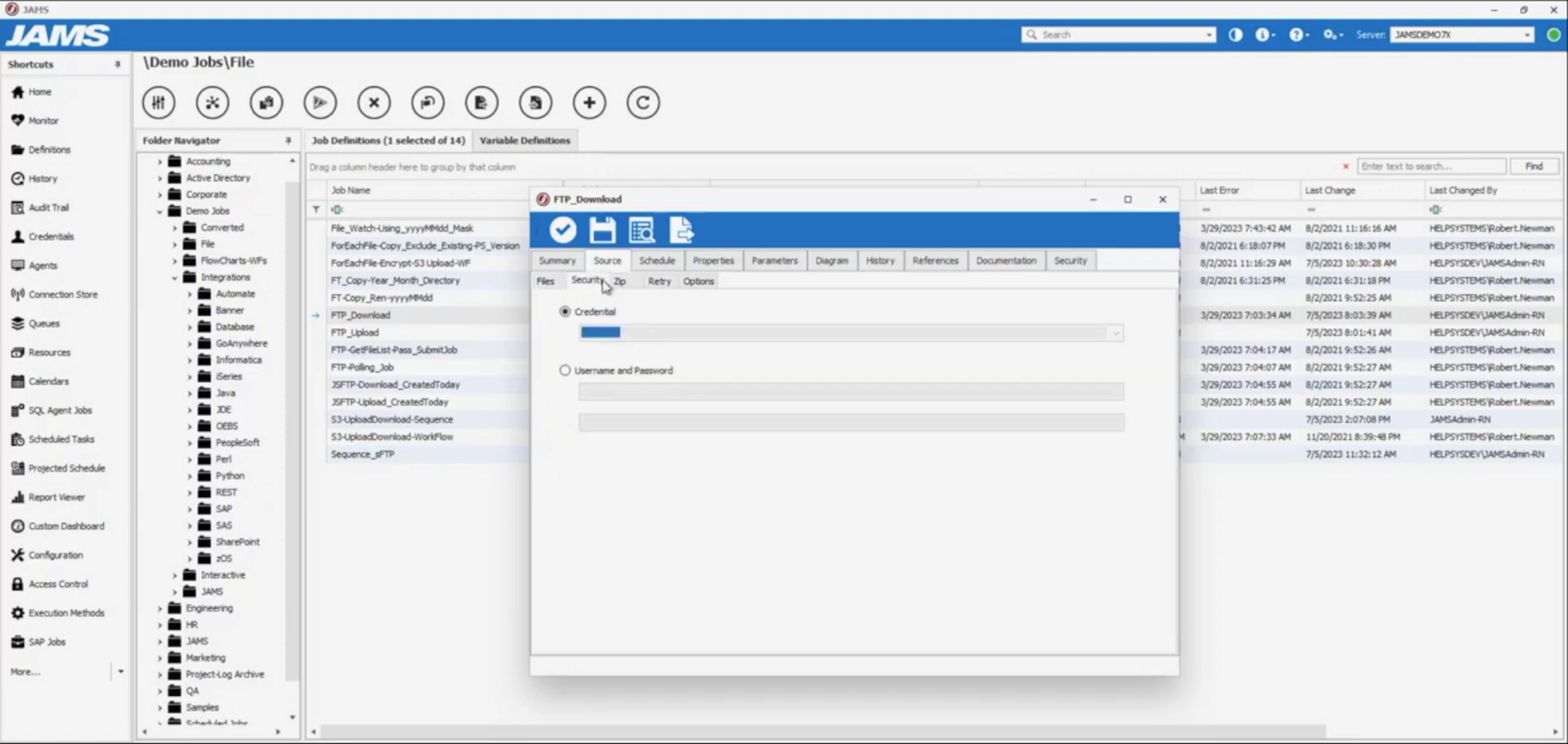
  • Define jobs: Create job definitions with timeouts, exit code handling, retries, and notifications. Externalize variables and credentials to simplify promotion across environments.
  • Orchestrate workflows: Build multistep sequences with dependency checking and conditional logic. Add event triggers for files, emails, or API calls so jobs start from real system signals.
  • Add monitoring and SLA guards: Use centralized monitoring and the diagram view to see workflow state and upstream dependencies. You can configure alerts and diagnostics to surface jobs that may impact SLAs.
  • Migrate existing schedules: Use the conversion utility to import schedules, exceptions, credentials, and job sources from popular scheduling tools. Review flagged edge cases, such as complex dependencies, and address them with migration services if needed.
Test and Promote

Run sample workloads in a non-production folder. Inject failures, validate retries and notifications, review run history, and audit entries. Promote to production using consistent names, parameters, and calendars.

Manage Promotion Jobs

To manage promotion jobs:

  • Tune and promote: Use diagnostics to optimize performance and adjust queues and resource limits. Standardize calendars and maintenance windows to stabilize throughput and reduce noise.
  • Extend with APIs and MFT: Automate programmatically through the REST API and .NET API. Use the managed file transfer client for reliable file movement within workflows.
Maintain Consistency Throughout the Process

Reference full documentation and Help Videos for task-by-task guidance. Enroll in JAMS University for training and best practices. Access 24/7 support or professional services when you want expert help.

Testimonials/Quotes (use case specific)

G2 Review

“JAMS has almost all possible ways to automate the file transfer and execution of scripts. The Sequencing feature was helpful in completing the automation easily with the good UI.”

Vinothkumar K.

Read Full Review Quote

G2 Review

“I really like JAMS because it ensures all our batch jobs are organized and run on time without us needing to watch over them. We link it up to our databases and file transfer systems…It allows us to avoid keeping track of things ourselves and avoid skipping important parts.”

Martin I.

E-commerce Manager

Read Full Review Quote

G2 Review

“Drag and drop modules and tasks make scheduling complex jobs a breeze. Integrations such as File Transfer Protocol, PGP encryption/decryption, and compression tools are all the great features and add significant value.”

Verified User

Utilities

Read Full Review Quote

G2 Review

“We use JAMS to automate data transfers, quality checks and load raw data from multiple sources into our data warehouse. JAMS allows us to automate this entire process, which uses multiple programming languages and statistical programs. We work with about 50 different data providers using different transfer processes, and JAMS lets us be compatible with all of these.”

Jesse D.

Data Manager

Read Full Review Quote

Why Leading Organizations Choose JAMS

Here is why businesses worldwide partner with us for enterprise job scheduling:

  • Our PowerShell scripting tools are rigorously tested and trusted by organizations that demand the best, including Raymond James, Coca-Cola Canada, and Teradata.
  • We consistently transform our users’ operations. G2 reviews highlight JAMS as a “game-changer,” streamlining complex processes and providing “true cross-platform automation.”
  • Our expert team is available 24/7 to assist you, ensuring your operations run smoothly and efficiently, whenever you need us.
Why Leading Organizations Choose JAMS

Badges

Automate Managed File Transfers with JAMS

Start a Free Trial