
JAMS Scheduler Features: Scheduling, Monitoring, and Orchestration
Every JAMS Scheduler feature in 12 groups, each linked to the documentation behind it.
JAMS Scheduler is an enterprise scheduler that runs, monitors, and orchestrates jobs across Windows, Linux, UNIX, IBM i, OpenVMS, and z/OS from one console. This reference covers what it does, grouped the way the documentation is, with a link to the source for every capability.
01
Scheduling and triggers
JAMS Scheduler decides when a job runs from schedules written in plain language, calendars your organization defines, and triggers that react to events.
Natural-language schedules
Write schedules such as “1st Friday of Month” instead of cron expressions.
Dates and Date Types
Define classes of days, such as fiscal periods, that a dozen jobs can all respect.
Named Times
Set windows when jobs may run, and get an alert if a job runs outside one.
7 trigger types
Start jobs on a schedule, an interval, or a recurrence, or when a job completes, a file arrives, a variable changes, or an email lands.
02
Dependencies and preconditions
A dependency holds a job in the Monitor until its conditions are met, so work runs in the right order across servers.

Job dependencies
Release a job only after the upstream jobs it depends on have finished.
Waiting for Prerequisites
A held job shows this state in the Monitor until every condition is met.
Precheck Jobs
Write your own dependency logic for any pre-processing check the built-in types don’t cover.
03
Workflows and Sequences
Sequence Jobs combine individual tasks into one ordered flow that you design visually and run as a single job.
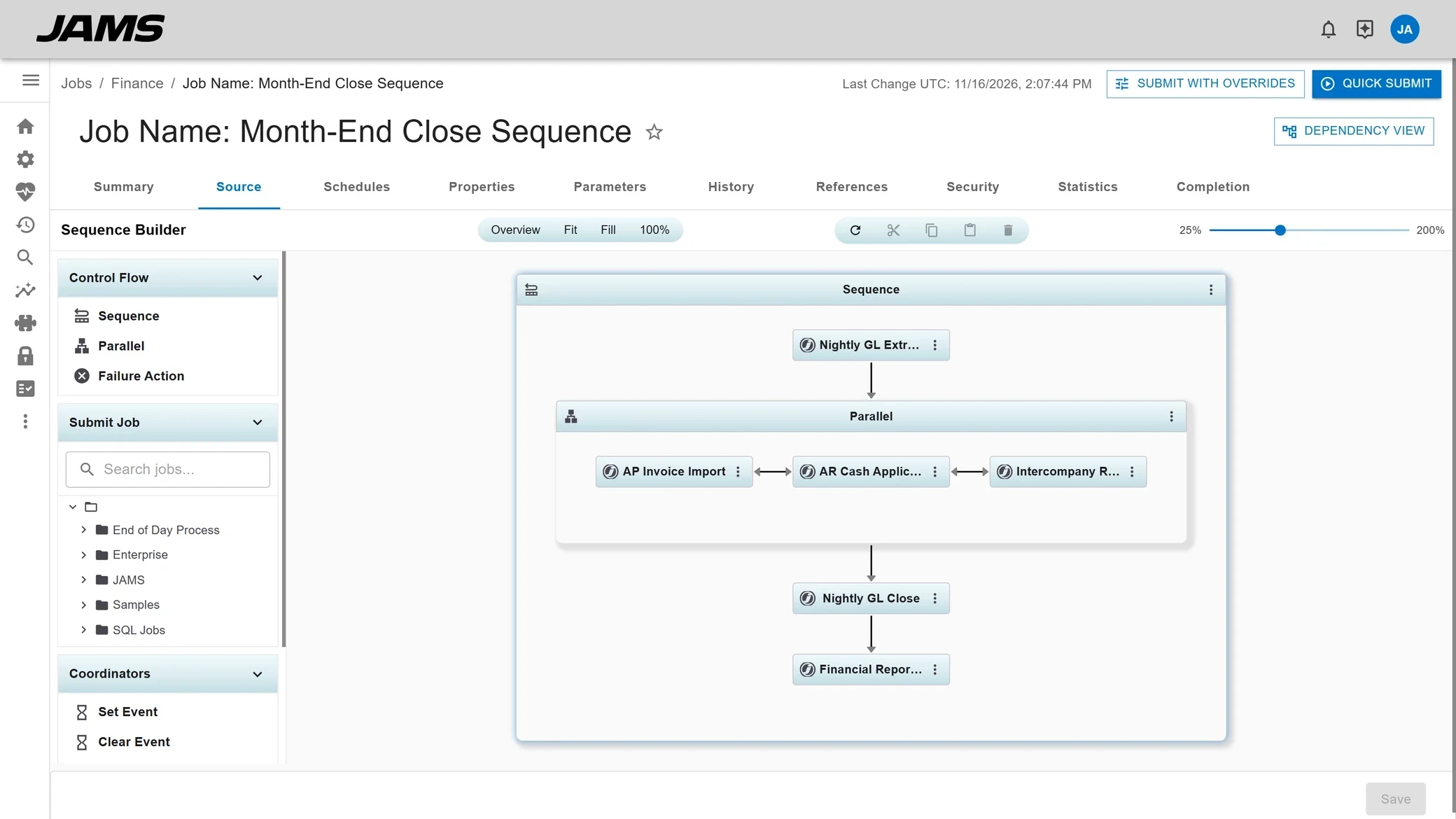
Sequence designer
Assemble tasks from the Task Toolbox in the Design Area.
Parallel Tasks
Run several jobs side by side inside one Sequence.
File Transfer Tasks
Add file transfers, including Amazon S3, as steps in a Sequence.
04
Execution and Agents
An Execution Method defines how a job runs and an Agent runs it on the target system, so one console reaches every platform you schedule.
70+ built-in Execution Methods
Use them with Job Definitions without extra setup, or copy one as a template for your own.
Agents per platform
Windows, Linux and UNIX, IBM i, and OpenVMS Agents, plus a passive Agent for z/OS.
Queues
Cap how many jobs start at once and load balance them across Agents.
Resources
Give jobs a weight so JAMS Scheduler knows which ones can run together.
05
Monitoring and alerting
The Monitor shows every job that is running, waiting, or finished, and job status events turn problems into notifications or recovery jobs.

Monitor
See running and waiting entries for every job in one view.
Runaway, short, and stalled
Flag a job that runs too long, finishes too fast, or waits on a prerequisite.
Events and notifications
Send an email or run a recovery job when a job fails or completes.
06
File transfer
File Transfer Jobs move files over the standard protocols, on the same schedules, dependencies, and alerts as every other job.

FTP and FTPS
Classic FTP, plus FTP over TLS/SSL with encrypted passwords and data.
SFTP and SCP
Transfers over SSH, with encrypted passwords and data.
Amazon S3
Move files to and from S3 with File Transfer Tasks in a Sequence Job.
07
Dashboards and reporting
JAMS Scheduler shows what ran and what will run, through dashboards, scheduled reports, and graphical views of upcoming and related jobs.

Dashboards
Start with the preinstalled dashboards, then build custom ones.
Scheduled reports
Send reports from the Schedule tab of a job.
Projected Schedule
View pending jobs across any time range.
Job Diagram
See every upstream and downstream job and dependency for a job before you change it.
08
Security and access
Access Control Lists decide which users and groups can do what in JAMS Scheduler, and the Audit Trail records what changed.

Active Directory ACLs
Grant access to Active Directory users and groups, inherited down through Folders.
Credentials and Azure Key Vault
Store accounts as Credentials, or read secrets from Azure Key Vault at runtime.
Audit Trail with revert
Review changes, roll Jobs and Folders back to an earlier version, and restore deleted ones.
09
High availability and disaster recovery
A failover Scheduler stands by on a second server and takes over when the primary stops answering its heartbeat.
Failover heartbeat
A 60-second heartbeat by default, with takeover after 3 missed beats.
Disaster recovery setup
Give the server and its Agents DR equivalents with distinct names.
Upgrades with failover
Upgrade JAMS Scheduler using the primary and failover pair.
10
APIs and automation as code
JAMS Scheduler can be managed from code as well as from its clients, through PowerShell, .NET, and REST.
PowerShell module
Cmdlets and a PowerShell provider, including export and import cmdlets.
.NET API
Build on JAMS Scheduler from your own .NET code.
REST API
Installed alongside the Web Client.
Folder inheritance
Set properties and ACLs on a Folder and every job below inherits them unless overridden.
11
AI
JAX and JAMS MCP bring AI to job scheduling, and both work within each user’s permissions.
JAX
An AI agent in the Web Client that troubleshoots failures and finds jobs in plain language.
JAMS MCP
Connects Cursor, VS Code with Copilot, Claude Code, Claude Desktop, and Codex to JAMS Scheduler.
Approvals
Changes JAX proposes need approval before they apply.
12
Integrations and migration
Integration packs connect JAMS Scheduler to ERP, data, and cloud platforms, and JUMP converts job definitions from other schedulers.
Integration packs
SAP, JD Edwards, Ellucian Banner, Informatica, Azure Data Factory, and more.
z/OS
Schedule mainframe jobs with nothing installed on the z/OS host.
JUMP
Convert existing job definitions into JAMS jobs, starting with a free Dry Run report.
See it before you talk to anyone
Click through JAMS Scheduler in a few minutes, no sign-up needed.