JAMS includes a custom PowerShell host that it uses when executing PowerShell scripts. This provides better error control, improved parameter passing, host to script communication and detached UI capabilities.
PowerShell Automation
JAMS Scheduler is proud to offer robust Powershell automation for Windows, the command line and scripting language developed by Microsoft to help administrators work more efficiently with applications running on the Windows platform.
What a Job Scheduler Needs to Use PowerShell Scripts for Batch Processing
The introduction of PowerShell by Microsoft in 2006 was a game-changer for administrators and application developers, enabling them to work more efficiently with applications running on the Windows platform. To effectively schedule PowerShell scripts for batch processing, there are three specific elements a job scheduler must have:
- Engineered on the .NET Framework
Microsoft designed PowerShell to provide task automation and configuration management tools based on the .NET Framework. PowerShell includes a command-line shell and an extensive scripting language that uses small programs called ‘cmdlets.’ The ability to fully incorporate into this .NET architecture is essential to unlock the extensive functionality within PowerShell. - Enterprise Scalability
Within a distributed environment, organizations can potentially run up to millions of jobs per day. Managing these environments requires technology that can handle the loads and address these scaling issues. You need the ability to automatically centralize, track, orchestrate, and run jobs efficiently and effectively by leveraging PowerShell alongside an enterprise job scheduler. - Object-Based Approach
PowerShell cmdlets provide command-line syntax and scripting syntax that you can type commands into. These cmdlets are designed to deal with objects, or structured information that goes beyond text or characters on the screen. Look for a solution that includes specific cmdlets that make it easy to manage, manipulate, and control the scheduler using PowerShell.
Why Choose JAMS for Your Powershell Scheduled Tasks
JAMS is the ideal PowerShell automation solution for administrators and application developers in need of a .NET job scheduler to easily and rapidly integrate batch processing into PowerShell scripts or use PowerShell scripts to manage their batch processing. JAMS provides the tools developers need to break a complex application into manageable units. By dividing a large, complex application into smaller, parallel units of work, you gain the ability to distribute the work across multi-core and virtual servers and can schedule virtually unlimited PowerShell scripts to execute—making you and your team highly efficient.
JAMS leverages PowerShell unlike any other job scheduling vendor due to the fact that JAMS is the only job scheduler engineered on the .NET framework.
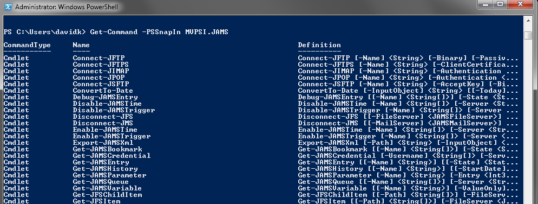
JAMS includes a PowerShell module that contains over 70 JAMS specific cmdlets which make it easy to manage, manipulate and control JAMS using PowerShell. And our cmdlets follow all PowerShell naming and usage guidelines and make full use of the object pipeline.
The JAMS module also includes a PowerShell provider that exposes the JAMS object hierarchy. Moving and managing JAMS objects is as easy as moving and managing files.
How to Create a JAMS Job Using PowerShell
You can also easily create a Job in JAMS to call your .bat file (or any other PowerShell script) using PowerShell with the provided commands here:
#
# Import the JAMS PowerShell Module
#
Import-Module JAMS -ErrorAction SilentlyContinue
#
# Add a PowerShell drive to access your JAMS environment
#
New-PSDrive JD JAMS localhost -ErrorAction SilentlyContinue
#
# Create the new Job object
#
$job = New-Item JD:\Samples\MyJob123 -itemtype Job -MethodName Command
$job.Description = “This job was added programmatically”
#
# Create and Add a Schedule Trigger to the Job
#
$ScheduleTrigger = [MVPSI.JAMS.ScheduleTrigger]::New(“Monday, Tuesday, Wednesday, Thursday”,[MVPSI.JAMS.TimeOfDay]”23:40″)
$ScheduleTrigger.Enabled = $false
$job.Elements.Add($ScheduleTrigger)
#
# Define Jobs Source
#
$job.Source = “start-process C:Pathfile.bat”
#
# Update the Job object for changes to take effect
#
$job.Update()
How to Use the Submit-JAMSEntry cmdlet
If you want to run your JAMS Job using PowerShell, you can use the Submit-JAMSEntry cmdlet.
Submit-JAMSEntry: The Submit-JAMSEntry command is used to manually submit a job to the current schedule.
Example 1: This command will submit the job “Sleep 60” on the specified server.
Submit-JAMSEntry -Name Sleep60 -Server PROD_SERVER1
Example 2: This command will submit the Setup “Logs_Setup” into the current schedule and wait until it is released from a manual hold.
Submit-JAMSEntry -Name Logs_Setup -Hold

PowerShell ISE
PowerShell ISE can be launched from the JAMS source code editor. PowerShell ISE offers a rich environment for editing PowerShell scripts. This means that JAMS users can take advantage of autocomplete and PowerShell help features when editing their PowerShell jobs. After changes have been saved, JAMS seamlessly loads the changes back into the source code editor. Integration with PowerShell ISE gives JAMS users access to more resources, and the ability to test their scripts while writing them, saving valuable time.
Additional information on JAMS PowerShell Support can be found on the JAMS Support Site.