
IntegrationsAll integrations

Menu

Menu

Enterprise Workload Automation Software

JAMS Scheduler runs and monitors workloads across Windows, Linux, and cloud environments from one console, with SAP, JD Edwards, and Azure Data Factory jobs in the same schedule. Jobs follow dependencies across platforms, failures alert the right people, and every run is logged.

What Is Workload Automation?

Workload automation is software that schedules, runs, and monitors jobs across servers, applications, and clouds from one place. It replaces separate schedulers like cron, SQL Server Agent, and Windows Task Scheduler with one system that handles dependencies, retries, alerts, and run history. Here’s how workload automation differs from job scheduling.

JAMS Scheduler does this for hybrid environments: one schedule for on-premises servers, AWS, and Azure, with consistent naming, versioning, and access controls across all of it.

Design Automated Workflows

Designing an automated workflow in JAMS starts with a few key decisions about structure, dependencies, and error handling. This tutorial walks through the workflow design process so your automation is built to be reliable, visible, and maintainable from day one.

  • Plan and structure a multi-step automated workflow

  • Configure job dependencies and execution order

  • Set up error handling and conditional branching

  • Review your workflow in the visual job diagram

Deploy JAMS Workload Automation

Here is a practical sequence for implementing JAMS as your workload automation solution.

Initial Setup

Review these steps for how to set it up:

  • Install the scheduler: Choose your deployment model — on-premise or in the cloud, on AWS, or on Azure, and follow the installation guide to configure the JAMS database, web client, and thick client.

  • Plan topology and access: Set up folders, roles, and permissions. Establish naming conventions, parameters, and calendars to maintain consistent definitions and ensure clarity. Also, configure the credential vault to remove hardcoded secrets.

  • Deploy agents: Install JAMS agents on Windows and Linux hosts that run your jobs and define queues and resources.

Create or Move a Job Into JAMS

Create or move jobs into JAMS as needed, implementing automation one process at a time:

  • Configure integrations: Connect built-in integrations, including SAP, SQL databases, Azure Data Factory, PowerShell, and Python. Test connections and capture return codes and logs.

  • Define jobs: Create job definitions with timeouts, exit code handling, retries, and notifications. Externalize variables and credentials to simplify promotion across environments.

  • Orchestrate workflows: Build multistep sequences with dependency checking and conditional logic. Add event triggers for files, emails, or API calls so jobs start from real system signals.

  • Add monitoring and SLA guards: Use centralized monitoring and the diagram view to see workflow state and upstream dependencies. You can configure alerts and diagnostics to surface jobs that may impact SLAs.

  • Migrate existing schedules: Use the conversion utility to import schedules, exceptions, credentials, and job sources from popular scheduling tools. Review flagged edge cases, such as complex dependencies, and address them with migration services if needed.

Test and Promote

Run sample workloads in a non-production folder. Inject failures, validate retries and notifications, review run history, and audit entries. Promote to production using consistent names, parameters, and calendars.

Manage Promotion Jobs

To manage promotion jobs:

  • Tune and promote: Use diagnostics to optimize performance and adjust queues and resource limits. Standardize calendars and maintenance windows to stabilize throughput and reduce noise.

  • Extend with APIs and MFT: Automate programmatically through the REST API and .NET API. Use the managed file transfer client for reliable file movement within workflows.

Maintain Consistency Throughout the Process

Reference full documentation and Help Videos for task-by-task guidance. Enroll in JAMS University for training and best practices. Access 24/7 support or professional services when you want expert help.

Why IT Teams Choose JAMS Scheduler for Workload Automation

You want a partner who helps you standardize orchestration, reduce noise in production, and maintain SLAs. Here is how JAMS workload automation tools support that goal:

  • Trusted by Enterprises: Leading companies, such as Coca-Cola Canada and Teradata, rely on JAMS for end-to-end workload automation. Public reviews on G2, PeerSpot, and TrustRadius reflect real-world outcomes and day-two operations.

  • Real humans on three continents. Support lives in the United States, the United Kingdom, and Australia. We will never outsource this team.

  • Enablement That Accelerates Adoption: JAMS University teaches you how to orchestrate workload automation across multiple platforms and applications. Help Videos make it easier to teach your standards, reinforce naming and calendar conventions, and onboard new operators.

  • Straightforward, Scalable Pricing: Simple pricing and unlimited executions help you expand automation without reworking contracts or constraining workloads.

Centralize Workload Automation Across Windows, Linux, and Cloud

Consolidate Windows, Linux, and cloud workloads under a single scheduler and user interface. Standardize names, parameters, and calendars so jobs behave consistently across environments. Scale with unlimited executions and deploy on AWS or Azure without changing how you operate.

Centralize Orchestration

Consolidate Windows, Linux, and cloud workloads under a single scheduler and user interface. Standardize names, parameters, and calendars so jobs behave consistently across environments. Scale with unlimited executions and deploy on AWS or Azure without changing how you operate.

Centralize Orchestration

Consolidate Windows, Linux, and cloud workloads under a single scheduler and user interface. Standardize names, parameters, and calendars so jobs behave consistently across environments. Scale with unlimited executions and deploy on AWS or Azure without changing how you operate.

Automate Event and Dependency-Aware Workflows

Start work from real signals, such as file arrivals, emails, application programming interface (API) calls, or time — model dependencies and conditions to enforce the order of execution. Utilize parameters and variables to minimize duplication and maintain portable workflows.

Automate Event and Dependency-Aware Workflows

Start work from real signals, such as file arrivals, emails, application programming interface (API) calls, or time — model dependencies and conditions to enforce the order of execution. Utilize parameters and variables to minimize duplication and maintain portable workflows.

Monitor and Protect Performance

Monitor all jobs from a single console, featuring a diagram view to visualize both upstream and downstream impacts. Configure alerts and notifications, and surface jobs at risk of missing SLAs with diagnostics that pinpoint the next course of action. Shorten the time to root cause with run history, output, and exit codes in one place.

Monitor and Protect Performance

Monitor all jobs from a single console, featuring a diagram view to visualize both upstream and downstream impacts. Configure alerts and notifications, and surface jobs at risk of missing SLAs with diagnostics that pinpoint the next course of action. Shorten the time to root cause with run history, output, and exit codes in one place.

Secure Access and Audit

Apply RBAC so that teams see and change only what they should. Protect credentials in the platform instead of scripts. Maintain detailed audit trails to show who changed what and when, which helps with governance and reviews.

Secure Access and Audit

Apply RBAC so that teams see and change only what they should. Protect credentials in the platform instead of scripts. Maintain detailed audit trails to show who changed what and when, which helps with governance and reviews.

Orchestrate Diverse Integrations

Orchestrate SAP, IBM i, Oracle, Banner, SQL databases, Azure Data Factory, PowerShell, Python, and more using native integrations. Coordinate these tasks with the rest of your estate so handoffs are reliable.

Orchestrate Diverse Integrations

Orchestrate SAP, IBM i, Oracle, Banner, SQL databases, Azure Data Factory, PowerShell, Python, and more using native integrations. Coordinate these tasks with the rest of your estate so handoffs are reliable.

Leverage APIs for Extensibility

Use REST and .NET APIs to submit jobs, query status, update properties, and integrate orchestration into your toolchain. Treat workflows as part of your automation fabric and keep systems in sync.

Leverage APIs for Extensibility

Use REST and .NET APIs to submit jobs, query status, update properties, and integrate orchestration into your toolchain. Treat workflows as part of your automation fabric and keep systems in sync.

Streamline Migrations

Import schedules, exceptions, credentials, and job sources from popular schedulers with a conversion utility. JAMS flags edge cases like complex dependencies so you can address them methodically.

Streamline Migrations

Import schedules, exceptions, credentials, and job sources from popular schedulers with a conversion utility. JAMS flags edge cases like complex dependencies so you can address them methodically.

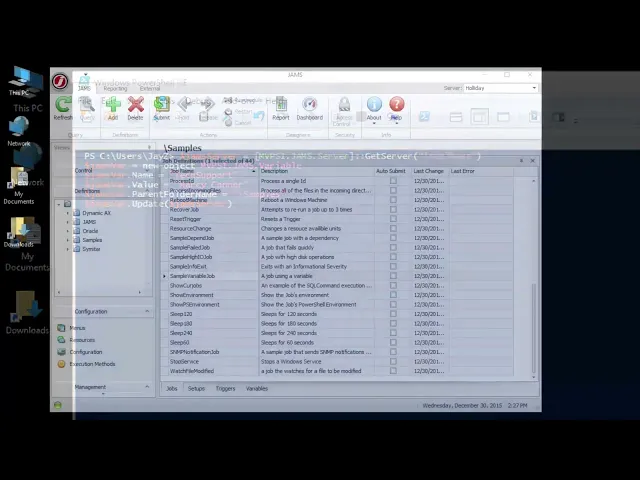
JAMS Variables and Parameters

Variables and parameters are what turn static JAMS jobs into dynamic, reusable automation. This tutorial covers how to define, pass, and reference them so you can build jobs that adapt at runtime without manual edits.

  • Unlock Job Adaptability

    • Customize batch jobs dynamically with powerful parameters.

    • Leverage variables for intelligent, conditional processing.

    • Maximize job reusability and minimize setup time.

  • Streamline Your Workflows

    • Automate complex sequences by passing precise inputs to jobs.

    • Reduce manual intervention and human error in your operations.

    • Ensure consistent and reliable execution of every batch task.

  • Gain Operational Insight

    • Understand how JAMS utilizes variables for responsive task management.

    • Track and manage job configurations with ease.

    • Achieve greater control and transparency over your batch environment.

FAQs

What audit trail capabilities does JAMS provide for automated jobs?

JAMS logs every job execution with full details including start and end times, exit codes, stdout/stderr output, and the user or process that triggered the job. It also tracks all changes to job definitions, agents, credentials, and execution methods—giving audit teams a complete, time-stamped record of activity.

How does JAMS protect sensitive data during automated job execution?

JAMS uses a centralized credential manager that stores and manages credentials securely, eliminating the need for plaintext passwords in scripts. Combined with role-based access controls and granular permissions, JAMS ensures that sensitive data and systems are only accessible to authorized users and processes.

Which industries are best served by JAMS workload automation?

JAMS serves enterprises across financial services, healthcare, retail, manufacturing, technology, education, and government. Its compliance and audit capabilities make it particularly well-suited for regulated industries, while its cross-platform support and ERP integrations address the needs of complex, heterogeneous IT environments.

How does JAMS scale for enterprises with thousands of automated jobs?

JAMS uses a distributed agent architecture, deploying lightweight agents close to workloads across platforms and environments. Combined with active-passive high availability clustering and load balancing, JAMS maintains reliable, consistent execution as job volumes grow.

Can I create or troubleshoot a job in plain language?

Yes. JAX AI, JAMS’s built-in agent, can find jobs, diagnose failures, and answer how-to questions right from the console. See how JAX AI works at jamsscheduler.com/product/features/jax.

What's the difference between workload automation and job scheduling?

Job scheduling runs tasks at set times or when an event happens. Workload automation builds on it by coordinating jobs across systems, applications, and clouds, with dependencies, monitoring, and error handling managed in one place. JAMS Scheduler covers both.

FAQs

What audit trail capabilities does JAMS provide for automated jobs?

JAMS logs every job execution with full details including start and end times, exit codes, stdout/stderr output, and the user or process that triggered the job. It also tracks all changes to job definitions, agents, credentials, and execution methods—giving audit teams a complete, time-stamped record of activity.

How does JAMS protect sensitive data during automated job execution?

JAMS uses a centralized credential manager that stores and manages credentials securely, eliminating the need for plaintext passwords in scripts. Combined with role-based access controls and granular permissions, JAMS ensures that sensitive data and systems are only accessible to authorized users and processes.

Which industries are best served by JAMS workload automation?

JAMS serves enterprises across financial services, healthcare, retail, manufacturing, technology, education, and government. Its compliance and audit capabilities make it particularly well-suited for regulated industries, while its cross-platform support and ERP integrations address the needs of complex, heterogeneous IT environments.

How does JAMS scale for enterprises with thousands of automated jobs?

JAMS uses a distributed agent architecture, deploying lightweight agents close to workloads across platforms and environments. Combined with active-passive high availability clustering and load balancing, JAMS maintains reliable, consistent execution as job volumes grow.

Can I create or troubleshoot a job in plain language?

Yes. JAX AI, JAMS’s built-in agent, can find jobs, diagnose failures, and answer how-to questions right from the console. See how JAX AI works at jamsscheduler.com/product/features/jax.

What's the difference between workload automation and job scheduling?

Job scheduling runs tasks at set times or when an event happens. Workload automation builds on it by coordinating jobs across systems, applications, and clouds, with dependencies, monitoring, and error handling managed in one place. JAMS Scheduler covers both.

FAQs

What audit trail capabilities does JAMS provide for automated jobs?

JAMS logs every job execution with full details including start and end times, exit codes, stdout/stderr output, and the user or process that triggered the job. It also tracks all changes to job definitions, agents, credentials, and execution methods—giving audit teams a complete, time-stamped record of activity.

How does JAMS protect sensitive data during automated job execution?

JAMS uses a centralized credential manager that stores and manages credentials securely, eliminating the need for plaintext passwords in scripts. Combined with role-based access controls and granular permissions, JAMS ensures that sensitive data and systems are only accessible to authorized users and processes.

Which industries are best served by JAMS workload automation?

JAMS serves enterprises across financial services, healthcare, retail, manufacturing, technology, education, and government. Its compliance and audit capabilities make it particularly well-suited for regulated industries, while its cross-platform support and ERP integrations address the needs of complex, heterogeneous IT environments.

How does JAMS scale for enterprises with thousands of automated jobs?

JAMS uses a distributed agent architecture, deploying lightweight agents close to workloads across platforms and environments. Combined with active-passive high availability clustering and load balancing, JAMS maintains reliable, consistent execution as job volumes grow.

Can I create or troubleshoot a job in plain language?

Yes. JAX AI, JAMS’s built-in agent, can find jobs, diagnose failures, and answer how-to questions right from the console. See how JAX AI works at jamsscheduler.com/product/features/jax.

What's the difference between workload automation and job scheduling?

Job scheduling runs tasks at set times or when an event happens. Workload automation builds on it by coordinating jobs across systems, applications, and clouds, with dependencies, monitoring, and error handling managed in one place. JAMS Scheduler covers both.

Reviews from IT Teams

G2 reviews of JAMS Scheduler
TrustRadius reviews of JAMS Scheduler
PeerSpot reviews of JAMS Scheduler
PeerSpot 2026 Tech Leader Award for JAMS Scheduler in Workload Automation

Our CEO reads and responds to every one.

Reviews from IT Teams

G2 reviews of JAMS Scheduler
TrustRadius reviews of JAMS Scheduler
PeerSpot reviews of JAMS Scheduler
PeerSpot 2026 Tech Leader Award for JAMS Scheduler in Workload Automation

Our CEO reads and responds to every one.

Reviews from IT Teams

G2 reviews of JAMS Scheduler
TrustRadius reviews of JAMS Scheduler
PeerSpot reviews of JAMS Scheduler
PeerSpot 2026 Tech Leader Award for JAMS Scheduler in Workload Automation

Our CEO reads and responds to every one.

Try JAMS Enterprise Workload Automation Software Today

Request a live demo or start your free trial to see what JAMS can do for your organization.

Try JAMS Enterprise Workload Automation Software Today

Request a live demo or start your free trial to see what JAMS can do for your organization.

Try JAMS Enterprise Workload Automation Software Today

Request a live demo or start your free trial to see what JAMS can do for your organization.